Create Free Resume

🧾 Create Your Resume for FREE — No Sign-Up Required

 
 
https://www.themuse.com/_next/image?q=75&url=https%3A%2F%2Fcms-assets.themuse.com%2Fmedia%2Flead%2F07242020-1159809871.jpg&w=3840
 

Build a Professional Resume in Minutes

Create a polished, job-ready resume completely free — no account, no hidden fees, no subscriptions, and no surprises.

Unlike many resume builders that require payment before download, Go Hires lets you build and download your resume instantly with nothing required.

👉 No sign-up
👉 No credit card
👉 No watermark
👉 No tricks

Just create your resume and use it.


⭐ Why Use This Free Resume Builder


✔ 100% free — forever
✔ No registration required
✔ Instant download
✔ Professional templates
✔ Easy editing
✔ Works for all industries
✔ ATS-friendly formats
✔ Privacy respected — nothing stored

Whether you are a student, job seeker, career changer, or professional, you can create a strong resume quickly and easily.


🧠 What Makes a Strong Resume
https://cvanywhere.com/blog188-2.jpg
https://resumeworded.com/blog/content/images/2022/03/update-resume.png
https://assets.qwikresume.com/resume-samples/pdf/screenshots/career-advisor-1569919748-pdf.jpg
 

A good resume clearly communicates your value to employers. Key elements include:

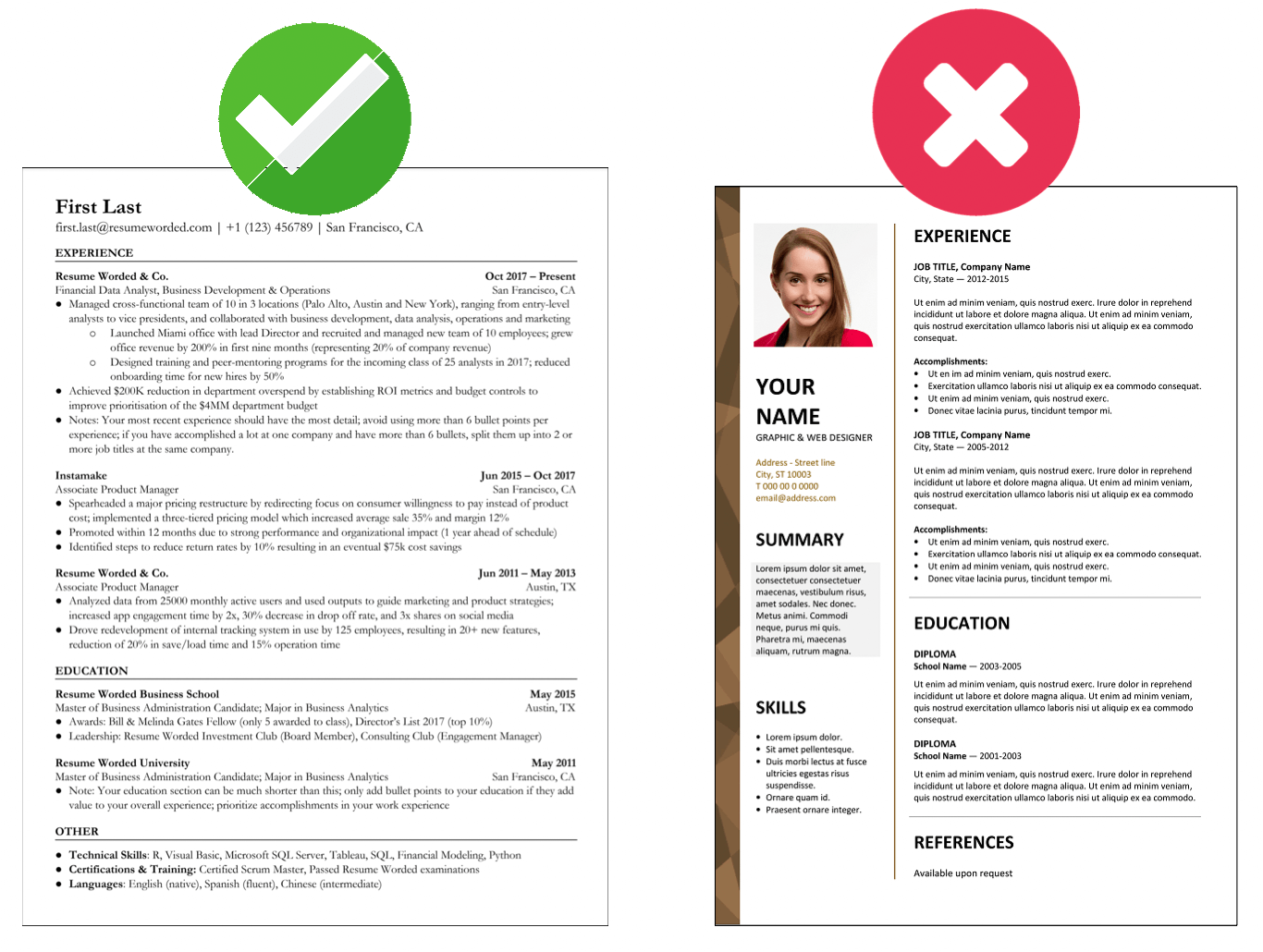
  • Clear contact information
  • Professional summary
  • Relevant work experience
  • Achievements and results
  • Skills tailored to the role
  • Education and certifications
  • Clean, readable layout

Our builder helps you organize these sections into a format recruiters expect.


🚀 How It Works

Creating your resume takes just a few simple steps:

  1. Enter your personal and professional information
  2. Choose a clean, professional template
  3. Customize sections as needed
  4. Download your resume instantly

No accounts, no waiting, no payment required.


💼 Who This Resume Builder Is For

https://zoo-ki3-nsdc-qc-content.s3.ca-central-1.amazonaws.com/14a3ea90-e677-442d-858e-5c76c98bc456/Get_Help_Job_Search_9a711bf243.jpg
 

This tool is ideal for:

  • Students and recent graduates
  • Entry-level job seekers
  • Career switchers
  • Professionals updating their resume
  • Remote job applicants
  • Anyone needing a quick, clean resume

🔒 No Sign-Up. No Hidden Costs. No Catch.

 
 
https://www.kensington.com/contentassets/a622b98786004b6696537970b4b9e8da/minimalist-desktop-set-up_1638470363.jpg

We believe creating a resume should be simple and accessible.

You will NOT encounter:

❌ Paywalls
❌ Forced subscriptions
❌ Hidden download fees
❌ Watermarked resumes
❌ Data selling
❌ Spam emails

Your information stays private, and your resume is yours.


⭐ Tips for Resume Success

  • Tailor your resume to each job
  • Highlight measurable achievements
  • Keep formatting clean and readable
  • Use action verbs
  • Proofread carefully
  • Include relevant skills

🎯 Start Building Your Resume Now

Create a professional resume that helps you stand out — completely free, with no registration required.

👉 Build your resume and download it instantly.

GoHires Career Tools

Free Canadian Resume Builder & ATS Checker

Create a clean, recruiter-ready résumé, compare it with a job description, and save it as a PDF. No account or payment required.

Your entries stay in this browser and are not submitted to GoHires.
Template:

1. Contact information

For Canadian applications, city and province are normally enough—avoid a full street address.

2. Professional summary

Aim for 40–80 words: your experience, strongest skills and the value you bring.

0 words

3. Work experience

Start bullets with action verbs and include numbers, time saved, revenue, volume or quality improvements.

4. Education

List your most relevant or recent credential first.

5. Skills and credentials

Use specific skills found in the job posting when they honestly match your experience.

6. Match a job description

Optional. Paste the posting to identify important terms that may be missing from your résumé.

0
Résumé readiness score

Start entering your information to receive practical checks.

    This automated review is guidance, not a guarantee that an applicant tracking system or employer will accept your résumé.

    Designed for Canadian applications

    The layout avoids photos, demographic details and complicated columns. It uses familiar headings that recruiters and résumé-scanning software can recognize.

    Write achievements, not duties

    Show what changed because of your work. Numbers such as percentages, dollars, time, team size and workload make an accomplishment easier to understand.

    Tailor every application

    Compare your résumé with the actual job description. Add relevant terminology only when it accurately reflects skills and experience you possess.

    Canadian résumé builder questions

    Is this résumé builder really free?

    Yes. You can complete the form, preview your résumé and use your browser’s print dialog to save it as a PDF without creating an account.

    Does GoHires store my personal information?

    This version builds the résumé in your browser. The information entered into the form is not intentionally submitted to GoHires. Clearing or closing the page removes the current form session.

    Should a Canadian résumé include a photo?

    For most Canadian job applications, a photo and personal demographic details are unnecessary. This template intentionally leaves them out.

    How do I download the résumé?

    Select “Download / Save PDF,” choose “Save as PDF” in the print window, confirm the preview and save the file to your device.